 站長資訊網(wǎng)
如何構(gòu)建Angular應(yīng)用程序?下面本篇文章給大家介紹一下使用MemFire Cloud構(gòu)建Angular應(yīng)用程序的方法,希望對大家有所幫助!

如何快速入門VUE3.0:進入學(xué)習(xí)
【相關(guān)教程推薦:《angular教程》】
MemFire Cloud是一款提供云數(shù)據(jù)庫,用戶可以創(chuàng)建云數(shù)據(jù)庫,并對數(shù)據(jù)庫進行管理,還可以對數(shù)據(jù)庫進行備份操作。它還提供后端即服務(wù),用戶可以在1分鐘內(nèi)新建一個應(yīng)用,使用自動生成的API和SDK,訪問云數(shù)據(jù)庫、對象存儲、用戶認證與授權(quán)等功能,可專注于編寫前端應(yīng)用程序代碼,加速WEB或APP應(yīng)用開發(fā)。
學(xué)習(xí)視頻地址: www.bilibili.com/video/BV1wt…
此示例提供了使用 MemFire Cloud 和 angular構(gòu)建簡單用戶管理應(yīng)用程序(從頭開始)的步驟。這包括:
- MemFire Cloud云數(shù)據(jù)庫:用于存儲用戶數(shù)據(jù)的 MemFireDB數(shù)據(jù)庫。
- MemFire Cloud用戶驗證:用戶可以使用魔法鏈接登錄(只需要電子郵件,不需要密碼)。
- MemFire Cloud存儲:用戶可以上傳照片。
- 行級安全策略:數(shù)據(jù)受到保護,因此個人只能訪問自己的數(shù)據(jù)。
- 即時API:創(chuàng)建數(shù)據(jù)庫表時會自動生成 API。
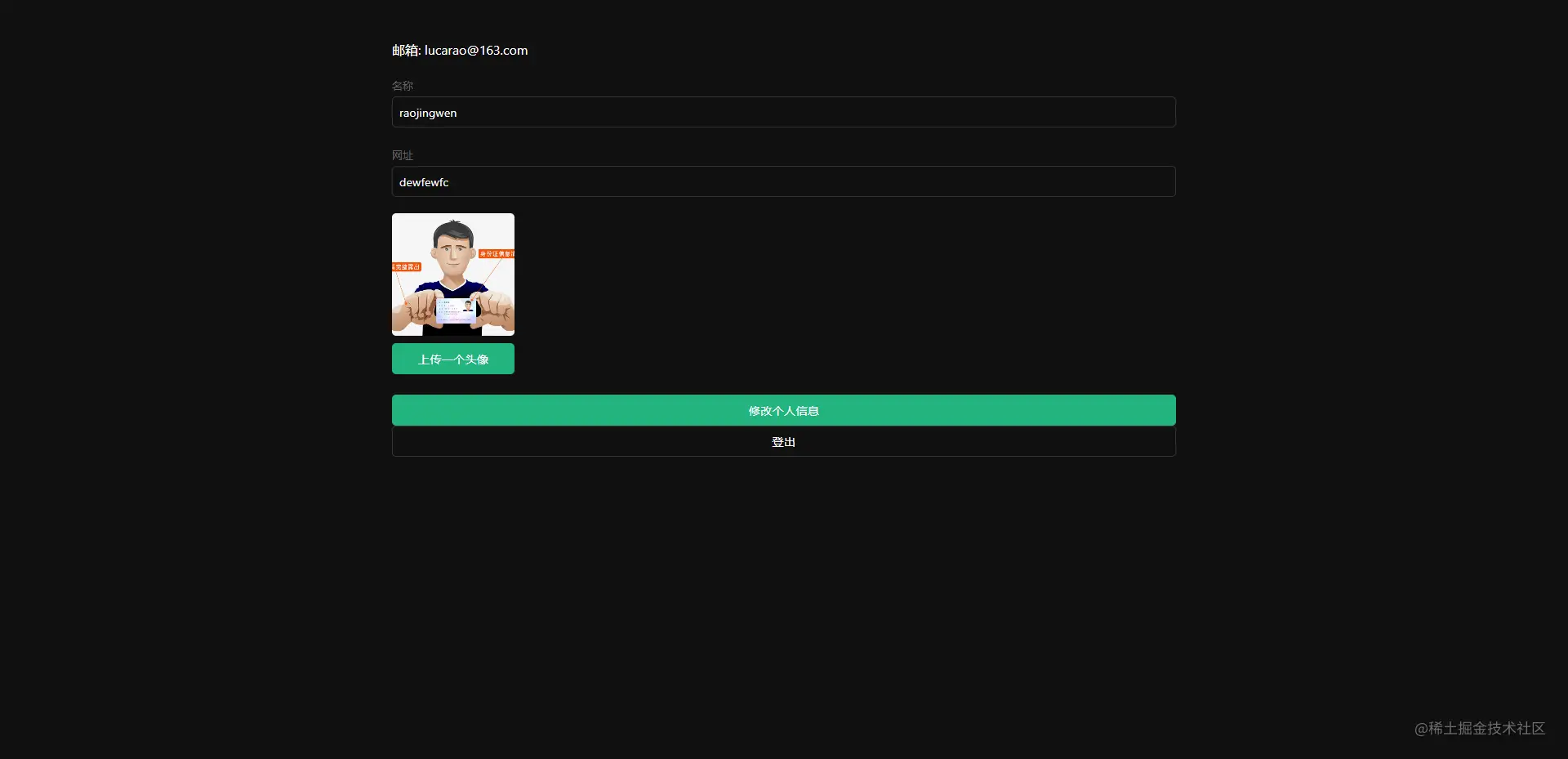
在本指南結(jié)束時,您將擁有一個允許用戶登錄和更新一些基本個人資料詳細信息的應(yīng)用程序:
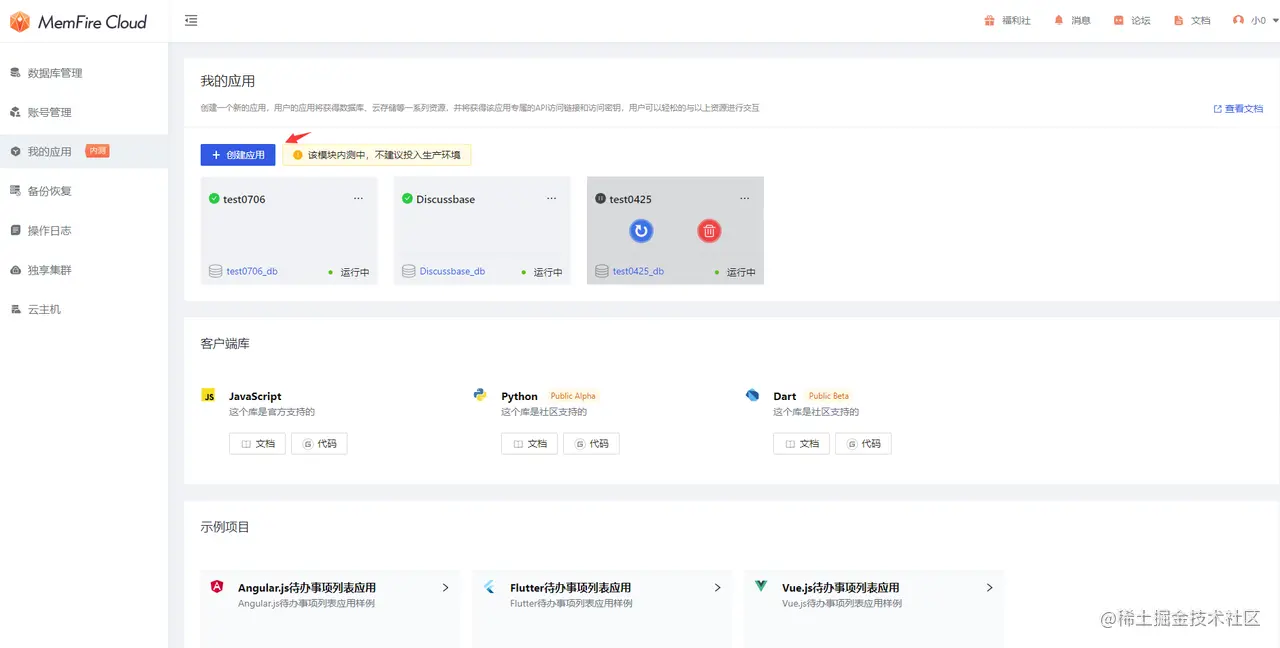
創(chuàng)建應(yīng)用
目的:我們的應(yīng)用就是通過在這里創(chuàng)建的應(yīng)用來獲得數(shù)據(jù)庫、云存儲等一系列資源,并獲得該應(yīng)用專屬的API訪問鏈接和訪問密鑰,用戶可以輕松的與以上資源進行交互。
登錄cloud.memfiredb.com/auth/login 創(chuàng)建應(yīng)用
創(chuàng)建數(shù)據(jù)表
點擊應(yīng)用,視圖化創(chuàng)建數(shù)據(jù)表
1、創(chuàng)建profiles表;
在數(shù)據(jù)表頁面,點擊“新建數(shù)據(jù)表”,頁面配置如下:
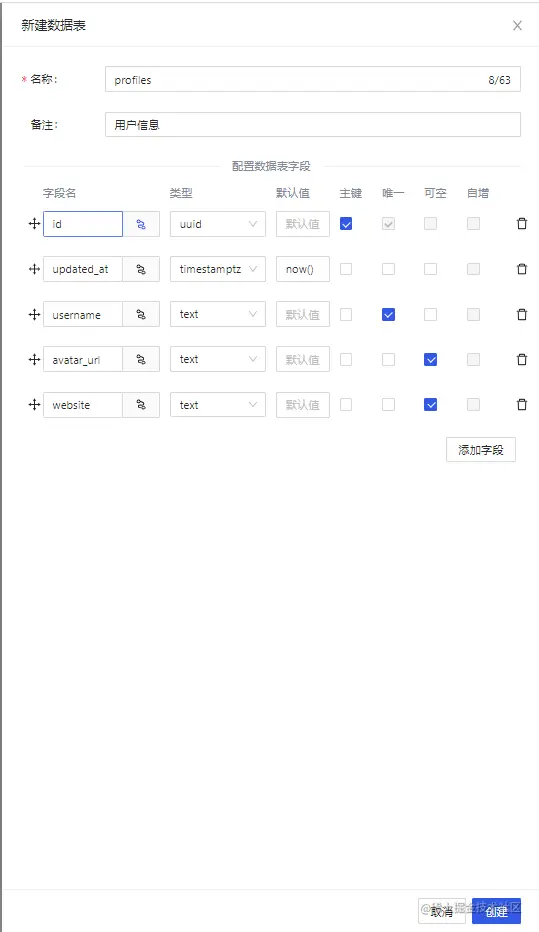
其中profiles表字段id和auth.users表中的id字段(uuid類型)外鍵關(guān)聯(lián)。
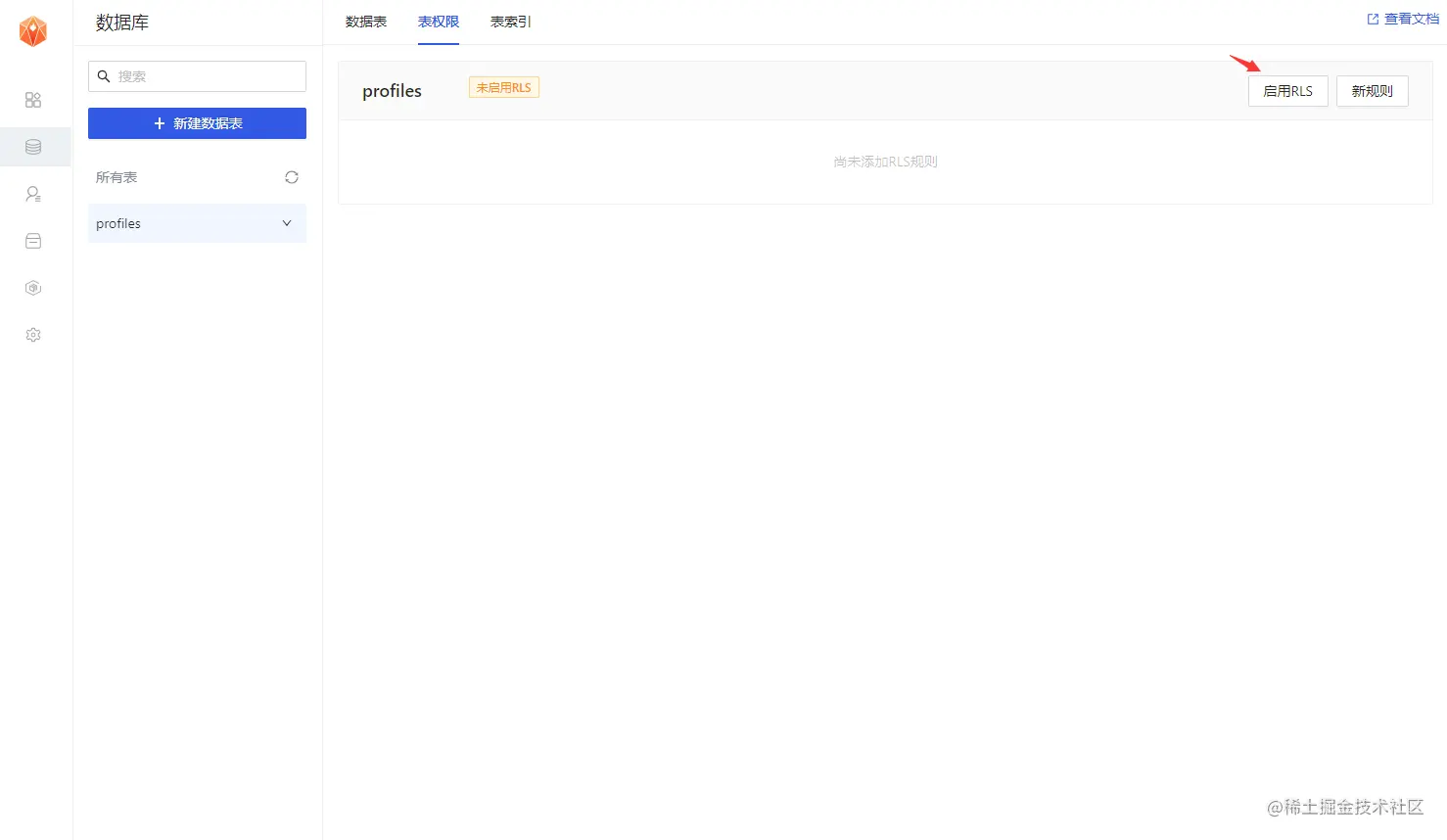
2、開啟Profiles的RLS數(shù)據(jù)安全訪問規(guī)則;
選中創(chuàng)建的Profiles表,點擊表權(quán)限欄,如下圖所示,點擊"啟用RLS"按鈕
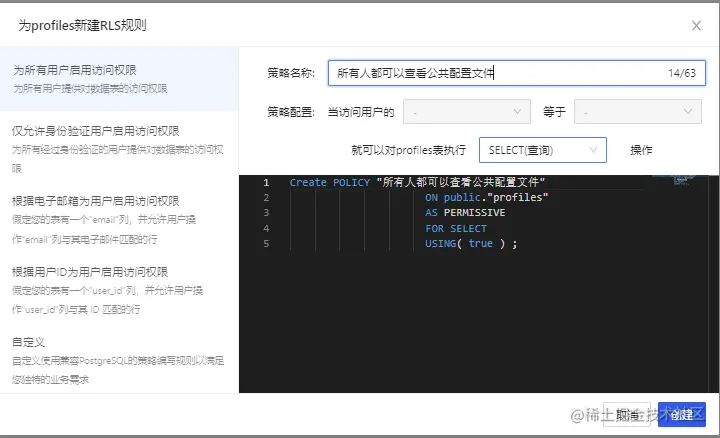
3、允許每個用戶可以查看公共的個人信息資料;
點擊"新規(guī)則"按鈕,在彈出彈框中,選擇"為所有用戶啟用訪問權(quán)限",輸入策略名稱,選擇"SELECT(查詢)"操作,點擊“創(chuàng)建策略”按鈕,如下圖。
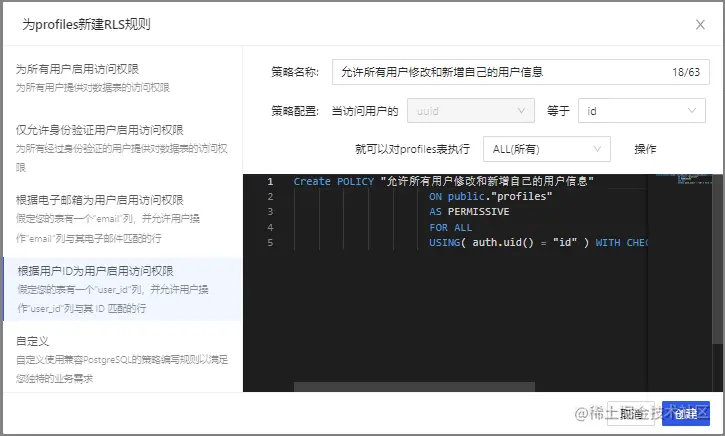
4、僅允許用戶增刪改查本人的個人資料信息;
點擊"新規(guī)則"按鈕,在彈出彈框中,選擇"根據(jù)用戶ID為用戶啟用訪問權(quán)限",輸入策略名稱,選擇"ALL(所有)"操作,點擊“創(chuàng)建策略”按鈕,如下圖。
創(chuàng)建avatars存儲桶
創(chuàng)建云存儲的存儲桶,用來存儲用戶的頭像圖片,涉及操作包括:
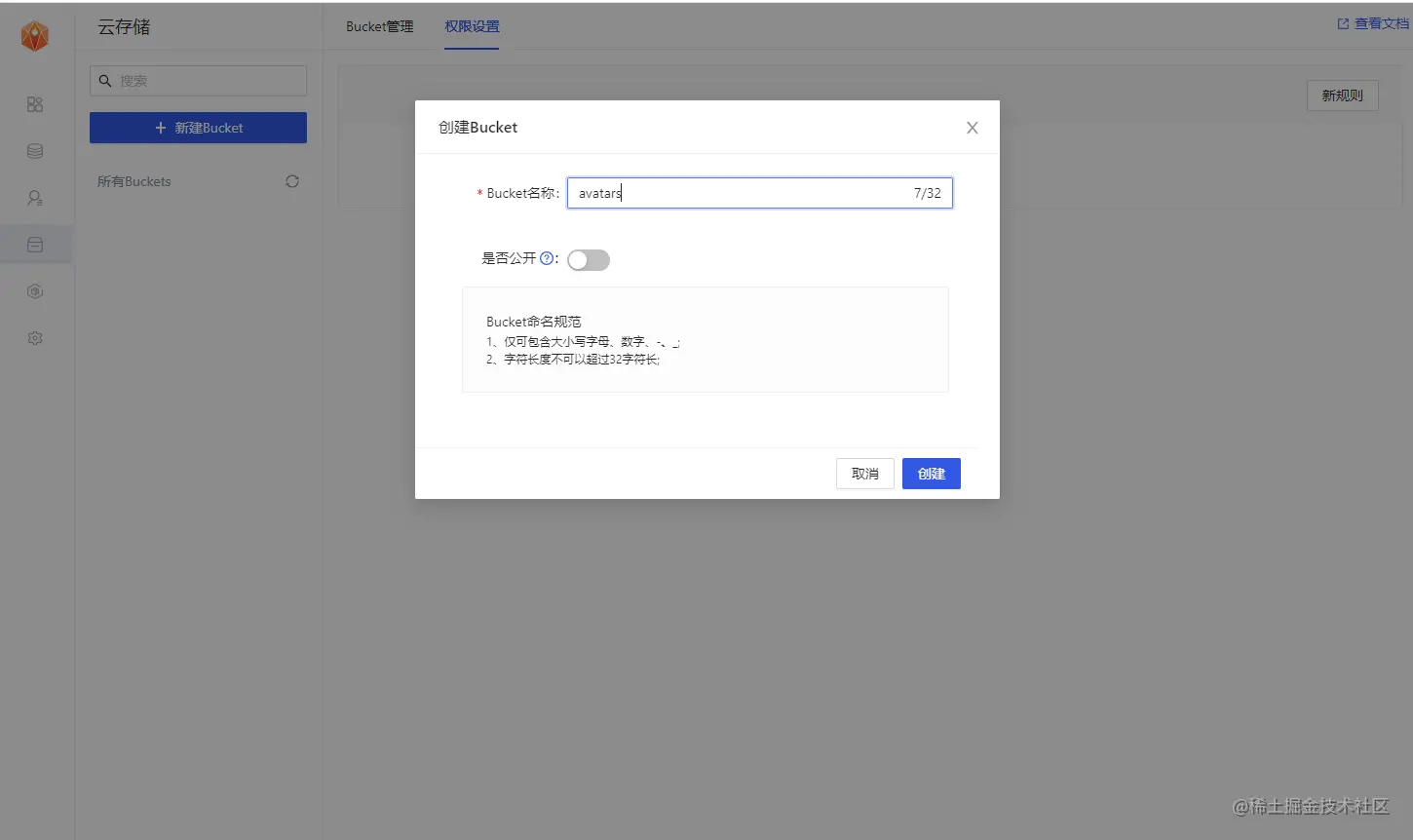
1、創(chuàng)建一個存儲桶avatars
在該應(yīng)用的云存儲導(dǎo)航欄,點擊“新建Bucket”按鈕,創(chuàng)建存儲桶avatars。
2、允許每個用戶可以查看存儲桶avatars
選中存儲桶avatars,切換到權(quán)限設(shè)置欄,點擊“新規(guī)則”按鈕,彈出策略編輯彈框,選擇“自定義”,如下圖所示:
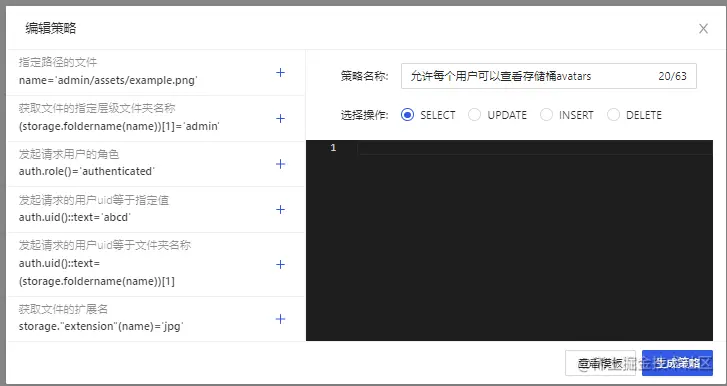
選擇SELECT操作,輸入策略名稱,點擊“生成策略”按鈕,如下圖所示。
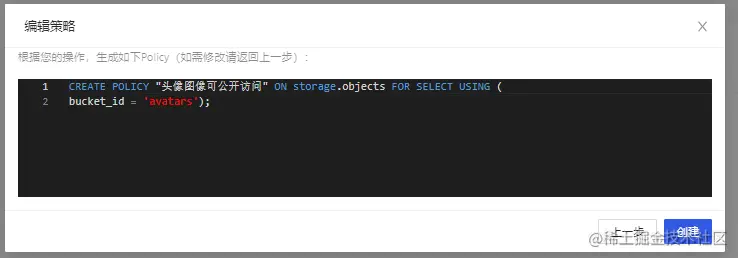
3、允許用戶上傳存儲桶avatars;
選中存儲桶avatars,切換到權(quán)限設(shè)置欄,點擊“新規(guī)則”按鈕,彈出策略編輯彈框,選擇“自定義”,如下圖所示:
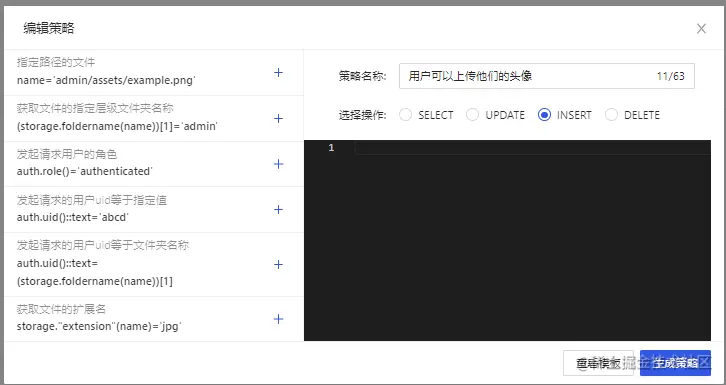
選擇INSERT操作,輸入策略名稱,點擊“生成策略”按鈕,如下圖所示。
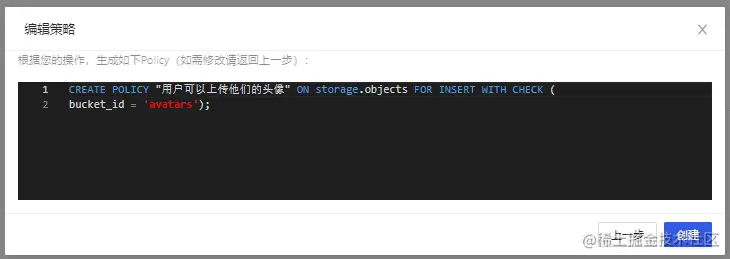
查看結(jié)果
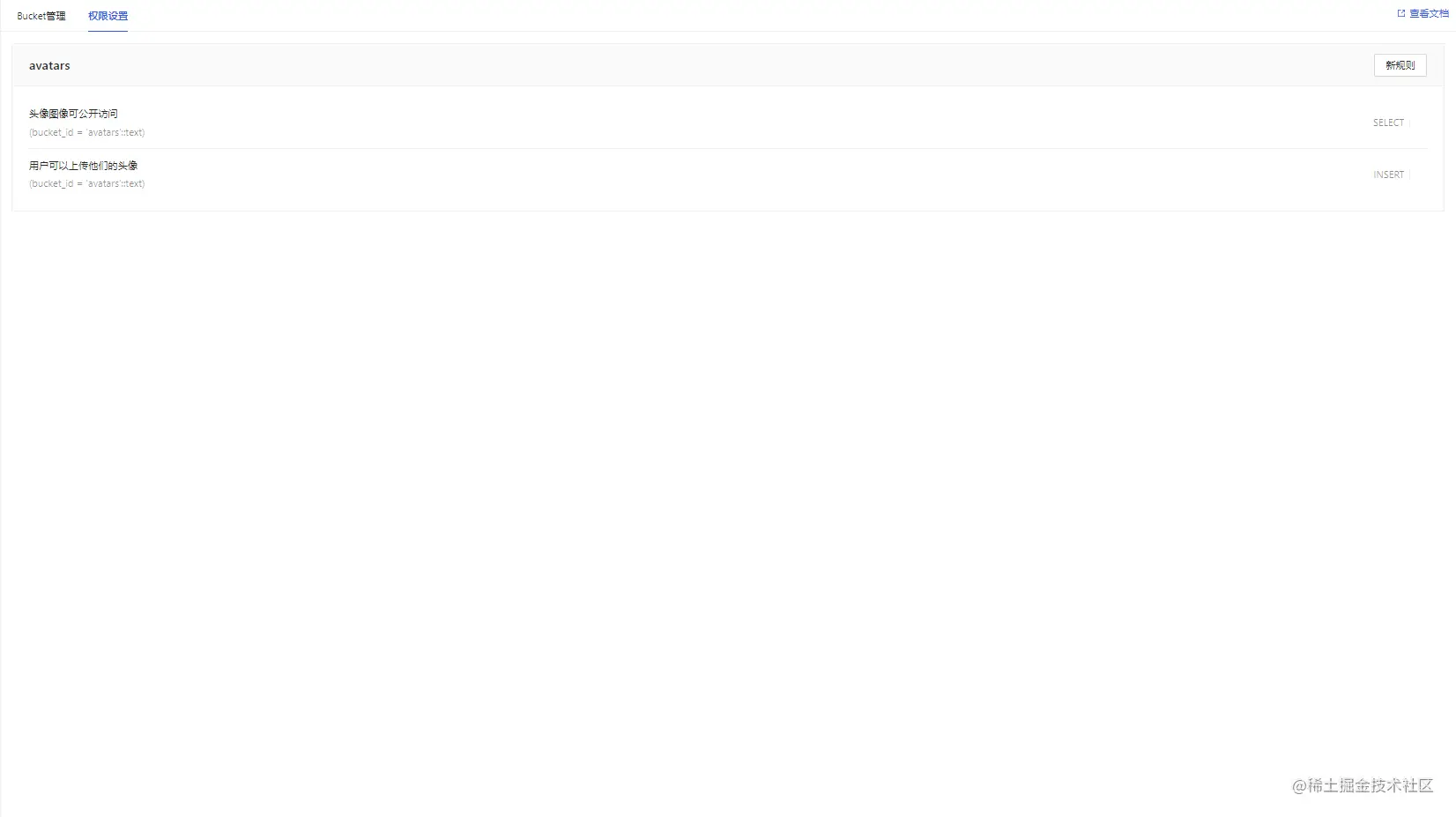
所有數(shù)據(jù)表及RLS的sql(策略名稱用英文代替)
-- Create a table for public "profiles" create table profiles ( id uuid references auth.users not null, updated_at timestamp with time zone, username text unique, avatar_url text, website text, primary key (id), unique(username), ); alter table profiles enable row level security; create policy "Public profiles are viewable by everyone." on profiles for select using ( true ); create policy "Users can insert their own profile." on profiles for insert with check ( auth.uid() = id ); create policy "Users can update own profile." on profiles for update using ( auth.uid() = id ); -- Set up Storage! insert into storage.buckets (id, name) values ('avatars', 'avatars'); create policy "Avatar images are publicly accessible." on storage.objects for select using ( bucket_id = 'avatars' ); create policy "Anyone can upload an avatar." on storage.objects for insert with check ( bucket_id = 'avatars' );
獲取 API秘鑰
現(xiàn)在您已經(jīng)創(chuàng)建了一些數(shù)據(jù)庫表,您可以使用自動生成的 API 插入數(shù)據(jù)。我們只需要從API設(shè)置中獲取URL和anon的密鑰。
在應(yīng)用->概括頁面,獲取服務(wù)地址以及token信息。
Anon(公開)密鑰是客戶端API密鑰。它允許“匿名訪問”您的數(shù)據(jù)庫,直到用戶登錄。登錄后,密鑰將切換到用戶自己的登錄令牌。這將為數(shù)據(jù)啟用行級安全性。
注意:service_role(秘密)密鑰可以繞過任何安全策略完全訪問您的數(shù)據(jù)。這個密鑰必須保密,并且要在服務(wù)器環(huán)境中使用,絕不能在客戶端或瀏覽器上使用。 在后續(xù)示例代碼中,需要提供supabaseUrl和supabaseKey。
認證設(shè)置
當(dāng)用戶點擊郵件內(nèi)魔法鏈接進行登錄時,是需要跳轉(zhuǎn)到我們應(yīng)用的登錄界面的。這里需要在認證設(shè)置中進行相關(guān)URL重定向的配置。
因為我們最終的應(yīng)用會在本地的4200端口啟動(亦或者其他端口),所以這里我們暫時將url設(shè)置為 http://localhost:4200
除此之外,在此界面也可以自定義使用我們自己的smtp服務(wù)器。
構(gòu)建應(yīng)用程序
讓我們從頭開始構(gòu)建 Angular應(yīng)用程序。
初始化項目
我們可以使用Angular CLI來初始化一個名為memfiredb-angular:
Angular 需要 Node.js (>=14.15 <=16.10) 。
npm install -g @angular/cli npx ng new memfiredb-angular --routing false --style css cd memfiredb-angular
然后讓我們安裝唯一的附加依賴項:supabase-js
npm install @supabase/supabase-js
最后,我們要將環(huán)境變量保存在environment.ts, 我們需要的是 API URL 和您上面anon復(fù)制的密鑰。
src/environments/environment.ts文件
export const environment = { production: false, supabaseUrl: "YOUR_SUPABASE_URL", supabaseKey: "YOUR_SUPABASE_KEY" };
現(xiàn)在我們已經(jīng)有了 API 憑證,通過ng g s supabase創(chuàng)建一個SupabaseService來初始化 Supabase 客戶端并實現(xiàn)與 Supabase API 通信的函數(shù)。
src/app/supabase.service.ts
import { Injectable } from '@angular/core'; import {AuthChangeEvent, createClient, Session, SupabaseClient} from '@supabase/supabase-js'; import {environment} from "../environments/environment"; export interface Profile { username: string; website: string; avatar_url: string; } @Injectable({ providedIn: 'root' }) export class SupabaseService { private supabase: SupabaseClient; constructor() { this.supabase = createClient(environment.supabaseUrl, environment.supabaseKey); } get user() { return this.supabase.auth.user(); } get session() { return this.supabase.auth.session(); } get profile() { return this.supabase .from('profiles') .select(`username, website, avatar_url`) .eq('id', this.user?.id) .single(); } authChanges(callback: (event: AuthChangeEvent, session: Session | null) => void) { return this.supabase.auth.onAuthStateChange(callback); } signIn(email: string) { return this.supabase.auth.signIn({email}); } signOut() { return this.supabase.auth.signOut(); } updateProfile(profile: Profile) { const update = { ...profile, id: this.user?.id, updated_at: new Date() } return this.supabase.from('profiles').upsert(update, { returning: 'minimal', // Don't return the value after inserting }); } downLoadImage(path: string) { return this.supabase.storage.from('avatars').download(path); } uploadAvatar(filePath: string, file: File) { return this.supabase.storage .from('avatars') .upload(filePath, file); } }
更新樣式
可以看到界面實在是不怎么優(yōu)雅,更新下樣式,讓它好看一些。 修改src/styles.css文件。
html, body { --custom-font-family: -apple-system, BlinkMacSystemFont, Segoe UI, Roboto, Oxygen, Ubuntu, Cantarell, Fira Sans, Droid Sans, Helvetica Neue, sans-serif; --custom-bg-color: #101010; --custom-panel-color: #222; --custom-box-shadow: 0 2px 8px 0 rgba(0, 0, 0, 0.8); --custom-color: #fff; --custom-color-brand: #24b47e; --custom-color-secondary: #666; --custom-border: 1px solid #333; --custom-border-radius: 5px; --custom-spacing: 5px; padding: 0; margin: 0; font-family: var(--custom-font-family); background-color: var(--custom-bg-color); } * { color: var(--custom-color); font-family: var(--custom-font-family); box-sizing: border-box; } html, body, #__next { height: 100vh; width: 100vw; overflow-x: hidden; } /* Grid */ .container { width: 90%; margin-left: auto; margin-right: auto; } .row { position: relative; width: 100%; } .row [class^='col'] { float: left; margin: 0.5rem 2%; min-height: 0.125rem; } .col-1, .col-2, .col-3, .col-4, .col-5, .col-6, .col-7, .col-8, .col-9, .col-10, .col-11, .col-12 { width: 96%; } .col-1-sm { width: 4.33%; } .col-2-sm { width: 12.66%; } .col-3-sm { width: 21%; } .col-4-sm { width: 29.33%; } .col-5-sm { width: 37.66%; } .col-6-sm { width: 46%; } .col-7-sm { width: 54.33%; } .col-8-sm { width: 62.66%; } .col-9-sm { width: 71%; } .col-10-sm { width: 79.33%; } .col-11-sm { width: 87.66%; } .col-12-sm { width: 96%; } .row::after { content: ''; display: table; clear: both; } .hidden-sm { display: none; } @media only screen and (min-width: 33.75em) { /* 540px */ .container { width: 80%; } } @media only screen and (min-width: 45em) { /* 720px */ .col-1 { width: 4.33%; } .col-2 { width: 12.66%; } .col-3 { width: 21%; } .col-4 { width: 29.33%; } .col-5 { width: 37.66%; } .col-6 { width: 46%; } .col-7 { width: 54.33%; } .col-8 { width: 62.66%; } .col-9 { width: 71%; } .col-10 { width: 79.33%; } .col-11 { width: 87.66%; } .col-12 { width: 96%; } .hidden-sm { display: block; } } @media only screen and (min-width: 60em) { /* 960px */ .container { width: 75%; max-width: 60rem; } } /* Forms */ label { display: block; margin: 5px 0; color: var(--custom-color-secondary); font-size: 0.8rem; text-transform: uppercase; } input { width: 100%; border-radius: 5px; border: var(--custom-border); padding: 8px; font-size: 0.9rem; background-color: var(--custom-bg-color); color: var(--custom-color); } input[disabled] { color: var(--custom-color-secondary); } /* Utils */ .block { display: block; width: 100%; } .inline-block { display: inline-block; width: 100%; } .flex { display: flex; } .flex.column { flex-direction: column; } .flex.row { flex-direction: row; } .flex.flex-1 { flex: 1 1 0; } .flex-end { justify-content: flex-end; } .flex-center { justify-content: center; } .items-center { align-items: center; } .text-sm { font-size: 0.8rem; font-weight: 300; } .text-right { text-align: right; } .font-light { font-weight: 300; } .opacity-half { opacity: 50%; } /* Button */ button, .button { color: var(--custom-color); border: var(--custom-border); background-color: var(--custom-bg-color); display: inline-block; text-align: center; border-radius: var(--custom-border-radius); padding: 0.5rem 1rem; cursor: pointer; text-align: center; font-size: 0.9rem; text-transform: uppercase; } button.primary, .button.primary { background-color: var(--custom-color-brand); border: 1px solid var(--custom-color-brand); } /* Widgets */ .card { width: 100%; display: block; border: var(--custom-border); border-radius: var(--custom-border-radius); padding: var(--custom-spacing); } .avatar { border-radius: var(--custom-border-radius); overflow: hidden; max-width: 100%; } .avatar.image { object-fit: cover; } .avatar.no-image { background-color: #333; border: 1px solid rgb(200, 200, 200); border-radius: 5px; } .footer { position: absolute; max-width: 100%; bottom: 0; left: 0; right: 0; display: flex; flex-flow: row; border-top: var(--custom-border); background-color: var(--custom-bg-color); } .footer div { padding: var(--custom-spacing); display: flex; align-items: center; width: 100%; } .footer div > img { height: 20px; margin-left: 10px; } .footer > div:first-child { display: none; } .footer > div:nth-child(2) { justify-content: left; } @media only screen and (min-width: 60em) { /* 960px */ .footer > div:first-child { display: flex; } .footer > div:nth-child(2) { justify-content: center; } } @keyframes spin { from { transform: rotate(0deg); } to { transform: rotate(360deg); } } .mainHeader { width: 100%; font-size: 1.3rem; margin-bottom: 20px; } .avatarPlaceholder { border: var(--custom-border); border-radius: var(--custom-border-radius); width: 35px; height: 35px; background-color: rgba(255, 255, 255, 0.2); display: flex; align-items: center; justify-content: center; } /* Auth */ .auth-widget { display: flex; flex-direction: column; gap: 20px; } .auth-widget > .button { display: flex; align-items: center; justify-content: center; border: none; background-color: #444444; text-transform: none !important; transition: all 0.2s ease; } .auth-widget .button:hover { background-color: #2a2a2a; } .auth-widget .button > .loader { width: 17px; animation: spin 1s linear infinite; filter: invert(1); } /* Account */ .account { display: flex; flex-direction: column; gap: 20px; } .account > * > .avatarField { display: flex; align-items: center; margin-bottom: 30px; } .account > * > .avatarField > .avatarContainer { margin-right: 20px; } /* Profile Card */ .profileCard { border-radius: 5px; display: flex; border: var(--custom-border); background-color: var(--custom-panel-color); padding: 20px 20px; margin-bottom: 20px; } .profileCard:last-child { margin-bottom: 0px; } .profileCard > .userInfo { margin-left: 20px; font-weight: 300; display: flex; flex-direction: column; justify-content: center; } .profileCard > .userInfo > p { margin: 0; } .profileCard > .userInfo > .username { font-size: 1.3rem; font-weight: 500; margin-bottom: 5px; } .profileCard > .userInfo > .website { font-size: 0.9rem; color: var(--custom-color-brand); margin-bottom: 10px; text-decoration: none; }
設(shè)置登錄組件
讓我們設(shè)置一個 Angular 組件來管理登錄和注冊。我們將使用 Magic Links,因此用戶無需使用密碼即可使用電子郵件登錄。使用Angular CLI 命令創(chuàng)建一個AuthComponent 。 ng g c auth
src/app/auth/auth.component.ts
import { Component } from '@angular/core'; import {SupabaseService} from "../supabase.service"; @Component({ selector: 'app-auth', template: ` <div class="row flex flex-center"> <form class="col-6 form-widget"> <h1 class="header">Memfiredb + Angular</h1> <p class="description">使用下面的電子郵件通過魔術(shù)鏈接登錄</p> <div> <input #input class="inputField" type="email" placeholder="Your email" /> </div> <div> <button type="submit" (click)="handleLogin(input.value)" class="button block" [disabled]="loading" > {{loading ? 'Loading' : 'Send magic link'}} </button> </div> </form> </div> `, }) export class AuthComponent { loading = false; constructor(private readonly supabase: SupabaseService) { } async handleLogin(input: string) { try { this.loading = true; await this.supabase.signIn(input); alert('請檢查您的電子郵件以獲取登錄鏈接!'); } catch (error:any) { alert(error.error_description || error.message) } finally { this.loading = false; } } }
用戶信息頁面
用戶登錄后,我們可以允許他們編輯他們的個人資料詳細信息并管理他們的帳戶。使用Angular CLI 命令創(chuàng)建一個AccountComponent 。 ng g c account
src/app/account/account.component.ts
import {Component, Input, OnInit} from '@angular/core'; import {Profile, SupabaseService} from "../supabase.service"; import {Session} from "@supabase/supabase-js"; @Component({ selector: 'app-account', template: ` <div class="form-widget"> <div> <label for="email">郵箱</label> <input id="email" type="text" [value]="session?.user?.email" disabled/> </div> <div> <label for="username">名稱</label> <input #username id="username" type="text" [value]="profile?.username ?? ''" /> </div> <div> <label for="website">網(wǎng)址</label> <input #website id="website" type="url" [value]="profile?.website ?? ''" /> </div> <div> <button class="button block primary" (click)="updateProfile(username.value, website.value)" [disabled]="loading" > {{loading ? 'Loading ...' : 'Update'}} </button> </div> <div> <button class="button block" (click)="signOut()"> 退出登錄 </button> </div> </div> ` }) export class AccountComponent implements OnInit { loading = false; profile: Profile | undefined; @Input() session: Session | undefined; constructor(private readonly supabase: SupabaseService) { } ngOnInit() { this.getProfile(); } async getProfile() { try { this.loading = true; let {data: profile, error, status} = await this.supabase.profile; if (error && status !== 406) { throw error; } if (profile) { this.profile = profile; } } catch (error:any) { alert(error.message) } finally { this.loading = false; } } async updateProfile(username: string, website: string, avatar_url: string = '') { try { this.loading = true; await this.supabase.updateProfile({username, website, avatar_url}); } catch (error:any) { alert(error.message); } finally { this.loading = false; } } async signOut() { await this.supabase.signOut(); } }
修改項目入口文件
現(xiàn)在我們已經(jīng)準備好了所有組件,讓我們更新AppComponent:
src/app/app.component.ts
import {Component, OnInit} from '@angular/core'; import {SupabaseService} from "./supabase.service"; @Component({ selector: 'app-root', template: ` <div class="container" style="padding: 50px 0 100px 0"> <app-account *ngIf="session; else auth" [session]="session"></app-account> <ng-template #auth> <app-auth></app-auth> </ng-template> </div> ` }) export class AppComponent implements OnInit { session = this.supabase.session; constructor(private readonly supabase: SupabaseService) { } ngOnInit() { this.supabase.authChanges((_, session) => this.session = session); } }
完成后,在終端窗口中運行它:
npm run start
然后打開瀏覽器到 http://localhost:4200,你應(yīng)該會看到完整的應(yīng)用程序。
實現(xiàn):上傳頭像及更新用戶信息
每個 MemFire Cloud項目都配置了存儲,用于管理照片和視頻等大文件。
創(chuàng)建上傳小組件
讓我們?yōu)橛脩魟?chuàng)建一個頭像,以便他們可以上傳個人資料照片。使用Angular CLI 命令創(chuàng)建AvatarComponent 。 ng g c avatar
src/app/avatar/avatar.component.ts
import {Component, EventEmitter, Input, Output} from '@angular/core'; import {SupabaseService} from "../supabase.service"; import {DomSanitizer, SafeResourceUrl} from "@angular/platform-browser"; @Component({ selector: 'app-avatar', template: ` <div> <img *ngIf="_avatarUrl" [src]="_avatarUrl" alt="Avatar" class="avatar image" style="height: 150px; width: 150px" ></div> <div *ngIf="!_avatarUrl" class="avatar no-image" style="height: 150px; width: 150px"></div> <div style="width: 150px"> <label class="button primary block" for="single"> {{uploading ? 'Uploading ...' : 'Upload'}} </label> <input style="visibility: hidden;position: absolute" type="file" id="single" accept="image/*" (change)="uploadAvatar($event)" [disabled]="uploading" /> </div> `, }) export class AvatarComponent { _avatarUrl: SafeResourceUrl | undefined; uploading = false; @Input() set avatarUrl(url: string | undefined) { if (url) { this.downloadImage(url); } }; @Output() upload = new EventEmitter<string>(); constructor( private readonly supabase: SupabaseService, private readonly dom: DomSanitizer ) { } async downloadImage(path: string) { try { const {data} = await this.supabase.downLoadImage(path); if (data instanceof Blob) { this._avatarUrl = this.dom.bypassSecurityTrustResourceUrl( URL.createObjectURL(data) ); } } catch (error:any) { console.error('下載圖片出錯: ', error.message); } } async uploadAvatar(event: any) { try { this.uploading = true; if (!event.target.files || event.target.files.length === 0) { throw new Error('必須選擇要上載的圖像。'); } const file = event.target.files[0]; const fileExt = file.name.split('.').pop(); const fileName = `${Math.random()}.${fileExt}`; const filePath = `${fileName}`; await this.supabase.uploadAvatar(filePath, file); this.upload.emit(filePath); this.downloadImage(filePath) } catch (error:any) { alert(error.message); } finally { this.uploading = false; } } }
然后我們可以在AccountComponent html 模板的頂部添加小部件:
src/app/account/account.component.ts
import {Component, Input, OnInit} from '@angular/core'; import {Profile, SupabaseService} from "../supabase.service"; import {Session} from "@supabase/supabase-js"; @Component({ selector: 'app-account', template: ` <app-avatar [avatarUrl]="this.profile?.avatar_url" (upload)="updateProfile(username.value, website.value, $event)"> </app-avatar> <div class="form-widget"> <div> <label for="email">郵箱</label> <input id="email" type="text" [value]="session?.user?.email" disabled/> </div> <div> <label for="username">名稱</label> <input #username id="username" type="text" [value]="profile?.username ?? ''" /> </div> <div> <label for="website">網(wǎng)址</label> <input #website id="website" type="url" [value]="profile?.website ?? ''" /> </div> <div> <button class="button block primary" (click)="updateProfile(username.value, website.value)" [disabled]="loading" > {{loading ? 'Loading ...' : 'Update'}} </button> </div> <div> <button class="button block" (click)="signOut()"> 退出登錄 </button> </div> </div> ` }) export class AccountComponent implements OnInit { loading = false; profile: Profile | undefined; @Input() session: Session | undefined; constructor(private readonly supabase: SupabaseService) { } ngOnInit() { this.getProfile(); } async getProfile() { try { this.loading = true; let {data: profile, error, status} = await this.supabase.profile; if (error && status !== 406) { throw error; } if (profile) { this.profile = profile; } } catch (error:any) { alert(error.message) } finally { this.loading = false; } } async updateProfile(username: string, website: string, avatar_url: string = '') { try { this.loading = true; await this.supabase.updateProfile({username, website, avatar_url}); alert("修改成功") } catch (error:any) { alert(error.message); } finally { this.loading = false; } } async signOut() { await this.supabase.signOut(); } }
恭喜!在這個階段,您擁有一個功能齊全的應(yīng)用程序!
