 站長資訊網
站長資訊網本篇文章帶大家繼續angular的學習,簡單了解一下angular中的自定義服務 notification,希望對大家有所幫助!

前端(vue)入門到精通課程,老師在線輔導:聯系老師
Apipost = Postman + Swagger + Mock + Jmeter 超好用的API調試工具:點擊使用
在之前的文章中,我們有提到:
service 不僅可以用來處理 API 請求,還有其他的用處
比如,我們這篇文章要講到的 notification 的實現。【相關教程推薦:《angular教程》】
效果圖如下:
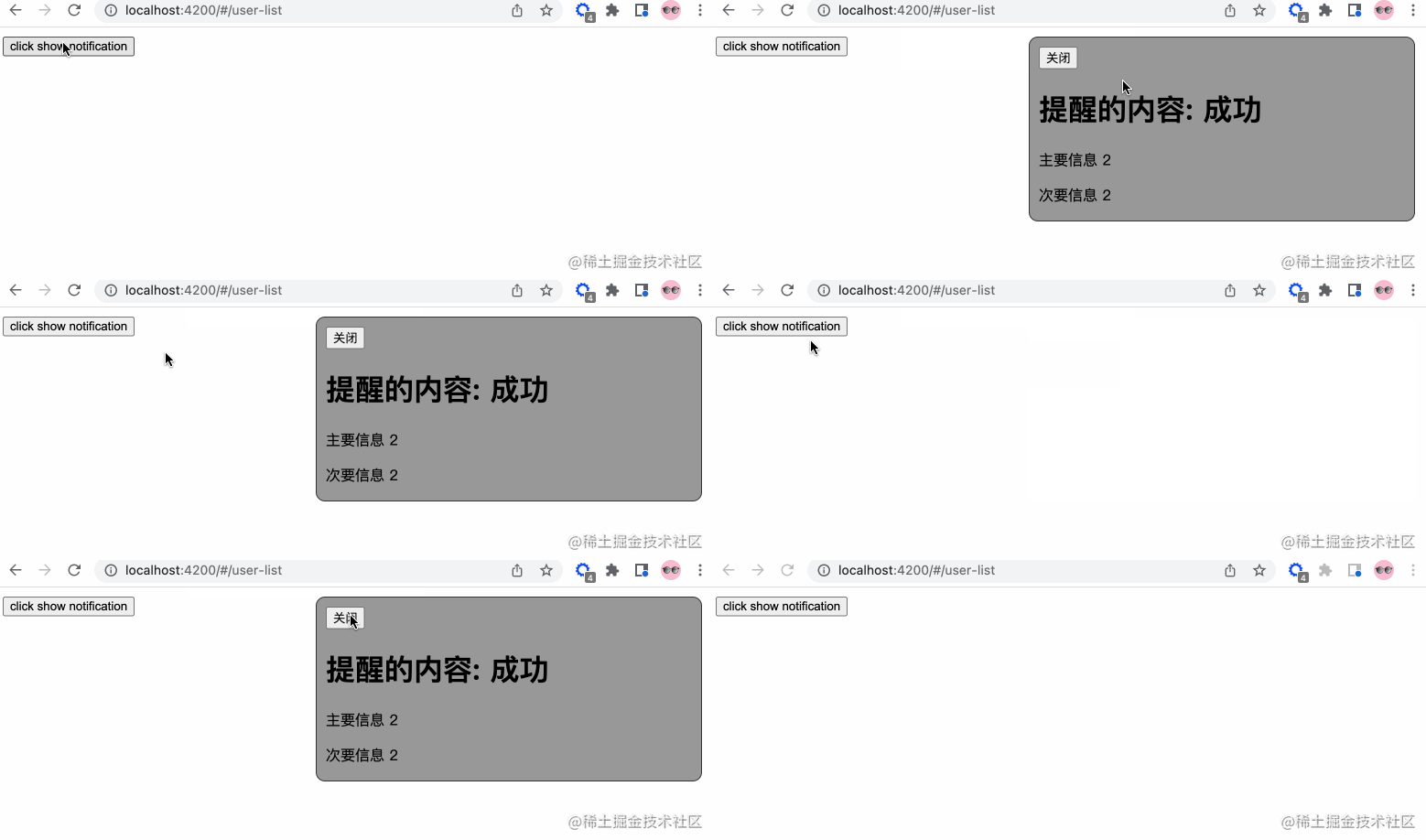
UI 這個可以后期調整
So,我們一步步來分解。
添加服務
我們在 app/services 中添加 notification.service.ts 服務文件(請使用命令行生成),添加相關的內容:
// notification.service.ts import { Injectable } from '@angular/core'; import { Observable, Subject } from 'rxjs'; // 通知狀態的枚舉 export enum NotificationStatus { Process = "progress", Success = "success", Failure = "failure", Ended = "ended" } @Injectable({ providedIn: 'root' }) export class NotificationService { private notify: Subject<NotificationStatus> = new Subject(); public messageObj: any = { primary: '', secondary: '' } // 轉換成可觀察體 public getNotification(): Observable<NotificationStatus> { return this.notify.asObservable(); } // 進行中通知 public showProcessNotification() { this.notify.next(NotificationStatus.Process) } // 成功通知 public showSuccessNotification() { this.notify.next(NotificationStatus.Success) } // 結束通知 public showEndedNotification() { this.notify.next(NotificationStatus.Ended) } // 更改信息 public changePrimarySecondary(primary?: string, secondary?: string) { this.messageObj.primary = primary; this.messageObj.secondary = secondary } constructor() { } }
登錄后復制
是不是很容易理解…
我們將 notify 變成可觀察物體,之后發布各種狀態的信息。
創建組件
我們在 app/components 這個存放公共組件的地方新建 notification 組件。所以你會得到下面的結構:
notification ├── notification.component.html // 頁面骨架 ├── notification.component.scss // 頁面獨有樣式 ├── notification.component.spec.ts // 測試文件 └── notification.component.ts // javascript 文件
登錄后復制
我們定義 notification 的骨架:
<!-- notification.component.html --> <!-- 支持手動關閉通知 --> <button (click)="closeNotification()">關閉</button> <h1>提醒的內容: {{ message }}</h1> <!-- 自定義重點通知信息 --> <p>{{ primaryMessage }}</p> <!-- 自定義次要通知信息 --> <p>{{ secondaryMessage }}</p>
登錄后復制
接著,我們簡單修飾下骨架,添加下面的樣式:
// notification.component.scss :host { position: fixed; top: -100%; right: 20px; background-color: #999; border: 1px solid #333; border-radius: 10px; width: 400px; height: 180px; padding: 10px; // 注意這里的 active 的內容,在出現通知的時候才有 &.active { top: 10px; } &.success {} &.progress {} &.failure {} &.ended {} }
登錄后復制
success, progress, failure, ended 這四個類名對應 notification service 定義的枚舉,可以按照自己的喜好添加相關的樣式。
最后,我們添加行為 javascript 代碼。
// notification.component.ts import { Component, OnInit, HostBinding, OnDestroy } from '@angular/core'; // 新的知識點 rxjs import { Subscription } from 'rxjs'; import {debounceTime} from 'rxjs/operators'; // 引入相關的服務 import { NotificationStatus, NotificationService } from 'src/app/services/notification.service'; @Component({ selector: 'app-notification', templateUrl: './notification.component.html', styleUrls: ['./notification.component.scss'] }) export class NotificationComponent implements OnInit, OnDestroy { // 防抖時間,只讀 private readonly NOTIFICATION_DEBOUNCE_TIME_MS = 200; protected notificationSubscription!: Subscription; private timer: any = null; public message: string = '' // notification service 枚舉信息的映射 private reflectObj: any = { progress: "進行中", success: "成功", failure: "失敗", ended: "結束" } @HostBinding('class') notificationCssClass = ''; public primaryMessage!: string; public secondaryMessage!: string; constructor( private notificationService: NotificationService ) { } ngOnInit(): void { this.init() } public init() { // 添加相關的訂閱信息 this.notificationSubscription = this.notificationService.getNotification() .pipe( debounceTime(this.NOTIFICATION_DEBOUNCE_TIME_MS) ) .subscribe((notificationStatus: NotificationStatus) => { if(notificationStatus) { this.resetTimeout(); // 添加相關的樣式 this.notificationCssClass = `active ${ notificationStatus }` this.message = this.reflectObj[notificationStatus] // 獲取自定義首要信息 this.primaryMessage = this.notificationService.messageObj.primary; // 獲取自定義次要信息 this.secondaryMessage = this.notificationService.messageObj.secondary; if(notificationStatus === NotificationStatus.Process) { this.resetTimeout() this.timer = setTimeout(() => { this.resetView() }, 1000) } else { this.resetTimeout(); this.timer = setTimeout(() => { this.notificationCssClass = '' this.resetView() }, 2000) } } }) } private resetView(): void { this.message = '' } // 關閉定時器 private resetTimeout(): void { if(this.timer) { clearTimeout(this.timer) } } // 關閉通知 public closeNotification() { this.notificationCssClass = '' this.resetTimeout() } // 組件銷毀 ngOnDestroy(): void { this.resetTimeout(); // 取消所有的訂閱消息 this.notificationSubscription.unsubscribe() } }
登錄后復制
在這里,我們引入了 rxjs 這個知識點,RxJS 是使用 Observables 的響應式編程的庫,它使編寫異步或基于回調的代碼更容易。這是一個很棒的庫,接下來的很多文章你會接觸到它
