 站長資訊網
站長資訊網如何在Angular中正確操作DOM元素?下面本篇文章給大家介紹一下angular操作DOM元素的方法,希望對大家有所幫助!

在angular獲取DOM元素可以使用
javascript的原生API,或者引入jQuery通過jquery對象操作DOM,但angular已經給我們提供了相應的API(ElementRef)來獲取DOM元素,就沒必要使用原生的API或者jQuery了。【相關教程推薦:《angular教程》】
ElementRef 獲取DOM元素
1、創建TestComponent組件,模板如下:test.component.html
<div> <p>你好</p> </div> <div> <span>世界</span> </div> <h1>標題</h1> <pass-badge id="component" textColor="red">組件</pass-badge>
登錄后復制
2、編寫test.component.ts文件
import { Component, OnInit } from '@angular/core'; // 1、導入 ElementRef 類 import { ElementRef} from '@angular/core'; import { PassBadge } from './compoment/pass-badge/pass-badge.component' @Component({ selector: 'app-test', templateUrl: './test.component.html', styleUrls: ['./test.component.css'], declarations: [ PassBadge ] }) export class TestComponent implements OnInit { // 2、將 ElementRef 類注入 test 組件中 constructor(private el:ElementRef) {} ngOnInit() { // 3、獲取 DOM 元素 console.log(this.el.nativeElement) console.log(this.el.nativeElement.querySelector('#component')) } }
登錄后復制
我們來看看this.el.nativeElement是什么
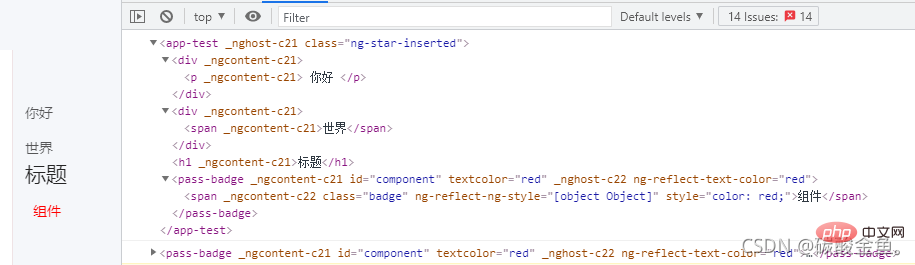
所以就可以通過this.el.nativeElement.querySelector('#component')來操作對應的DOM元素。例如改變文字顏色就可以
this.el.nativeElement.querySelector('#component').style.color = 'lightblue'
登錄后復制
模板變量獲取DOM元素
可以通過
ViewChild獲取組件,同樣的還有ContentChild,ViewChildren和ContentChildren
1、修改TestComponent組件,為對應元素加上模板變量,如下
<div> <p>你好</p> </div> <!-- 1、給元素加入模板變量 div --> <div #div> <span>世界</span> </div> <h1>標題</h1> <!-- 給組件加入模板變量 component --> <pass-badge #component textColor="red">組件</pass-badge>
登錄后復制
2、修改test.component.ts,如下:
import { Component, OnInit } from '@angular/core'; import { ElementRef} from '@angular/core'; // 2、引入ViewChild import { ViewChild } from '@angular/core' @Component({ selector: 'app-test', templateUrl: './test.component.html', styleUrls: ['./test.component.css'] }) export class TestComponent implements OnInit { constructor(private el:ElementRef) {} // 3、獲取元素 @ViewChild('component') dom: any; @ViewChild('div') div: any; ngOnInit() { console.log(this.dom) // PassBadgeComponent this.dom.fn() // 調用 passbadge 組件的 fn 方法 console.log(this.div) // ElementRef this.div.nativeElement.style.color = 'lightblue' // 文字顏色修改為淡藍色 } }
登錄后復制
最終結果如下
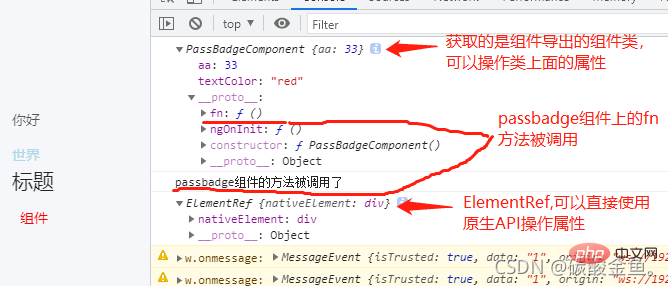
由結果我們可以知道,當使用
ViewChild模板變量獲取組件元素時,獲取到的是組件導出的組件類(上例是PassBadgeComponent),這時候只可以操作組件中含有的屬性。當使用
ViewChild模板變量獲取html元素時,獲取到的時ElementRef類型的類,這時可以通過this.div.nativeElement.querySelector('span')等原生API來操作元素
